Introducing Blog Posts and Life-Style Content

While I continue to work on adding the rest of the states in the U.S. to our database of resources I wanted to take minute to add and address a new feature of the site moving forward, blog posts and life-style content. This content will be more free form and experimental then what has been on the site thus far. The majority of this content will just be me posting about how my sight affects my day to day life, how I navigate it, the challenges that come with progressive vision loss, and the weird and humorous situations that 20/400 vision can occasionally get you into. The hope is that in sharing this content it helps demystify vision loss and hopefully helps those of you also experiencing vision loss feel a little less isolated. A lot of these daily blogs will be on my mundane daily life, but I do travel and go to music festivals whenever I get the chance, and look forward to sharing my experiences and how I personally navigate those trips with all of you.

Also included in these new posts will be opinion pieces about upcoming accessible technology and features, like what we did several years ago with the article several years ago about the potential of the HoloLens and Microsoft accessibility (oh poorly aged things), so look out for those as well.

Keep in mind this is just the beginning, we have more cool things cooking up in the background they will just take time and planning. This new content will also take time to iron out some of the formatting and uploading kinks, so please provide us with feedback as we start this new phase.

Thanks for reading and enjoy your week,

-Jack, Blind Resources

A Blind Legend Game Review

A Blind Legend was developed by Dowino for PC, IOS, and Google Play and was released in 2016.

You play as Edward Blake a legendary blind knight who embarks on a quest to save his wife after she’s kidnapped by an evil king. Joining you on you quest is Edward’s daughter, Louise (we’ll talk more about her later) who guides you with her voice. While the premise sounds a bit cliche, I found it to be enjoyable for what it was.

What’s unique about this game is that there are no visuals, you play the game based purely off of sound, so for those who have lost their vision and miss gaming this game is probably going to be for you.

The best part about A Blind Legend is the combat system. The game gives very clever audio cues to tell you when to either attack, block or parry. It’s simple yet fun, and I know I’m not the first to make this comparison, but it feels like the one of closest things we’ve gotten so far to a Daredevil game. My only complaint with the combat system is that by the end the developers reuse a lot of the same audio cues for different enemies and it gets a little annoying, but I feel it can be overlooked seeing as it’s a small indie developer.

My biggest gripe with the game is the traversal, and by extent Louise. While the traversal seems a great idea at first it quickly becomes a repetitive slog. What makes the traversal so unenjoyable is Louise (no disrespect meant towards the voice actress). Instead of staying by you and guiding you, Louise always runs a little ways ahead then yells one of about six voice lines that are then repeatedly used for the rest of the game. It almost made Navi’s (The Legend Of Zelda: Ocarina Of Time) screams of “Hey Listen!” seem enjoyable. The developers probably could have turned most of these sections into cut-scenes and have been better off for it. Instead it feels like they were a little too ambitious than what they could reasonably do with their budget, and I can at least applaud them for the effort.

The voice acting is serviceable at best. Edward is voice acted by Alex Laube who funnily enough sounds kind of like Jeremy Irons. Laube does his best but his performance ultimately fell flat and seemed kind of stiff to me. Next we have Tallulah Farquhar as Louise who would have been fine had they not repeatedly used the same voice lines over and over an over again.

Another thing worth mentioning is that the game gets almost downright hostile towards the player at the end and not in a good way. I’m fine with games being difficult, some of the best games of recent memory (Cuphead, Sekiro: Shadows Die Twice) are extremely difficult (and are even harder when you’re legally blind, trust me), but that difficulty is there because it enhances the game and makes it feel all the more rewarding. Here it feels forced and unnecessary.  Without getting into spoilers there’s this scene towards the end set in a crowded market where you’re having to follow the sound of Louise’s voice all while dodging guards. There also seems to be buckets and objects strewn about the level that if you run into the game will instantly fail you and send you back about ten minutes. The only way to  avoid the objects is to follow Louise (and her repetitive voice lines) almost precisely. This part when done correctly should take about 20 minutes tops. It took me nearly two hours. Maybe I just missed a trick to the level or something but when I check online most people seemed to be just as frustrated on that part as I was.

Conclusion: A Blind Legend is a great concept dragged down by repetitive voice lines, and a couple of technical woes. Ultimately If you’re blind I think you’ll find something worthwhile but know that the game isn’t perfect and it doesn’t really need to be. Honestly I think it’s awesome this game got made in the first place and would like to see this premise expanded upon in the future, maybe with a bigger budget.

6/10 or C+

Speaking Email App Review

Speaking Email is an app that uses your phones voice assistant to read you emails aloud to you hands free,and was developed by BEWEB LTD for the IOS app store, and Google Play store. The app does rely on a subscription service ($4.99 for a month, $9.99 for three months, or $29.99 for the year) but there is a free mode that has less features.

Probably the best thing about speaking email is the user interface. The simple design makes it super easy for the visually impaired to use the app. All the buttons are decently sized so those with residual vision should have no problem navigating. The app also has voice commands for those who are blind or just want to listen to emails while driving and can’t use their hands.

The app has a ton of customizable preferences so that you only see what you want to see in your emails. For example you can disable emails from the promotional and social categories. You can also choose which parts of the email get read such as subject, signatures, and attachments. You can even change the voice of the AI assistant that reads your emails.

My only real problem with Speaking Email is that the app can have a hard time telling between what’s spam/promotional and what’s important. For instance I got an email from google when I connected my G-mail to the app,  which the app thought was promotional material. Luckily if you swipe back or previous email it will go back and read it to you.

Pros:

  • Simple UI
  • Easy for the blind/visually impaired to use
  • Customizable preferences
  • Responsive voice commands

Cons:

  • Difficulties with spam/promotional material

Conclusion: Speaking Email is an incredible app that is a must have for those who are blind or have a visual impairment that prevents them from reading emails themselves.

Final Score: 9/10

Thanks for reading, be sure to keep an eye out for more content and reviews soon, and if you think there’s a product or app we should review please leave a comment.

Vhista App Review

Note: This app was reviewed in tandem with two other scanner apps TapTapSee, and Seeing AI.

Vhista is a scanner app for the blind and visually impaired developed by Juan David Cruz Serrano for the IOS app store , and Google Play store.

The first major issue I had was that a lot of times the camera doesn’t detect that there’s an object in front of it. This issue seems to be caused primarily by tabbing out of the app and then tabbing back in without restarting the app. While restarting the app seemed to help a little bit the detection was still pretty hit or miss.

Vhista’s biggest flaw is easily the detailed image scan which you activate by tapping the screen. Instead of actually telling you what the object is the app just spouts a bunch of guesses and hopes something lands. For example I scanned my dog (the Bulldog from previous reviews) and the app just gave me a list of dog breeds. While the first breed it guessed was the correct one, this method of object detection is more likely to cause confusion for those who are blind.

The active camera mode doesn’t fare much better. Almost every object the app managed to detect was incorrect. For example the app thought a trash can was a toilet, and that a light switch was a paper towel. While the app got both right upon scanning again, it’s probably enough for most to find a different app.

Pros:

  • Voice over support
  • Subscription is only 50 cents a month

Cons:

  • Does not show text for detailed scans
  • Most objects were incorrectly narrated
  • Does not do well with large print enabled
  • Requires a subscription

Conclusion: Vhista is a below average scanner app. Almost every object I scanned was incorrect and worse yet is the fact that the app didn’t detect a lot of the objects I tried to scan. If you’re looking for a proper scanner app you’re better off looking elsewhere.

4/10

Microsoft’s Seeing AI App Review

Note: this app was reviewed in tandem with two other scanner apps TapTapSee, and Vhista.

Seeing AI is a scanner app for the visually impaired developed by Microsoft for the IOS app store. The app uses an AI to narrate the world to mixed results.  The app includes nine scanner modes Short Text, Handwriting, Document, Product (bar-code), Person, Currency, Scene, Color, and Light scan.

First up is short text and handwriting. While it can recognize text semi-accurately it reads it in a random order making it an unusable mess. I tried scanning the cover of my copy of A Game Of Thrones because the text is in bold print which I thought would make it easier on the app. It ended up reading it as Martin Thrones R. R.

The handwriting mode works a little differently than short text mode. Instead of the text to speech continuously spewing word vomit, the app scans it into text which you can either read yourself if you have residual vision or have the text to speech read it to you if you’re full blind. I scanned handwriting three times and two out o the three times it was correct.

The document scan was a little more accurate than short text but was still pretty hit or miss. I scanned around three documents and only one was scanned with no typos. The other two times the words were either wrong or missing entirely. So if you need to have a document read to you I would look elsewhere.

The feature I found most useful was easily the product scanner. Each time I scanned a bar code it was able to correctly determine the product name. The only issue I could find with it is that people who are fully blind may have trouble scanning a bar code. The app is supposed to beep when a bar code is close but every time I scanned a product it failed to do so.

The person scan feature worked well enough. I scanned myself multiple times and each time the app got most of my facial details and expression right. My only issue with this feature is that it tries to predict age but ended up getting my age wrong (by about a decade) every time I scanned myself (about six times).  

The currency scan feature was surprisingly accurate, every time I scanned a bill it was able to accurately tell what the amount was. The only complaint I had was that it does not scan coins.

The biggest problem I had with Seeing AI was the general scan function or scene scan as it’s called in app . Almost every object I scanned was incorrect. So if you’re downloading Seeing AI for the general scan function don’t, there are much better apps out there such as TapTapSee.

Scene Scanner Accuracy Results:


Photo: Kingdom Hearts 3 PS4 Case

Object Subtitle: It seems to be screenshot, poster, cartoon, book, pc game, action-adventure game, action film, digital compositing, clothing, strategy video game

Accuracy: Wrong


Photo: Red Dead Redemption 2 PS4 Case

Object Subtitle: Probably a close up of a book

Accuracy: Wrong


Photo: Blade Runner 2049 Blu-ray Case

Object Subtitle: It seems to be poster, screenshot, vehicle, car, land vehicle, person, man, human face

Accuracy: Wrong


Photo: A Game Of Thrones By George R. R. Martin

Object Subtitle: Probably a close up of a sign

Accuracy: Wrong


Photo: Tazo Iced Green Tea Bottle

Object Subtitle: Probably an empty bottle sitting on a table

Accuracy:  Fairly Correct


Photo: Sun-Maid Organic Raisin Pack

Object Subtitle: It seems to be food, snack, dessert, baked goods, confectionery

Accuracy: Wrong


Photo: Red and White Cane for the Blind

Object Subtitle: it seems to be bicycle, bicycle wheel, indoor, toothbrush, stationary, writing implement, sports equipment, plastic, pen

Accuracy: Wrong


Photo: White, Grey, and Blue Converse Sneakers

Object Subtitle: Probably a group of shoes

Accuracy: Fairly Correct


Photo: Mead Five Star Notebook

Object Subtitle: Probably a close up of a computer

Accuracy: Wrong


Photo: White and Brown English Bulldog

Object Subtitle: a brown and white dog looking at the camera

Accuracy: Mostly Correct


Pros:

  • Free
  • Currency scanner
  • Product scanner
  • Quick processing time

Cons:

  • 3/10 accuracy for general image scanning
  • Money reader can’t scan coins
  • Face scanner can’t tell age
  • Inaccurate
  • Clunky UI (User Interface)

Conclusion: Overall Seeing AI was a mixed bag for me. For each good thing it felt like there were two caveats that came with it. However I still feel the app is worth a download for the product and currency features.

6/10

Thanks for reading, please keep an eye out for our review of Vhista as well as our round up of which of the three scanner apps is the best. If you have any suggestions of a review or topic you’d like to see us cover please feel free to leave a comment.


TapTapSee App Review

Note: this app was reviewed in tandem with two other object recognition apps (Seeing AI, Vhista).

TapTapSee is an Object Recognition app on the IOS app store, and Google Play store. The app is designed to help the blind and visually impaired by scanning objects through their phones camera.

TapTapSee’s user interface is by far the most user friendly out of the three object recognition apps I’ve been testing. Unlike the other object recognition apps there’s no category slider at the bottom to switch between what type of object you want to scan. All you do is tap the screen and it scans the image no matter what type of object it is , there’s no hassle of changing to a different category for certain objects.

The biggest draw back to TapTapSee is how long it takes to process an image once its been scanned. Once an image has been scanned it can take anywhere between 15 seconds and a minute to process the image.

Where it lacks in speed it makes up for in accuracy. almost every object I scanned was not only correct, but detailed. For example I scanned my dog and the app was able to tell not only the coloring but the breed (brown and white English Bulldog).

The app is also able to identify the titles of movies and video games based off of scanning the box, though it’s worth mentioning that it some times can struggle with more complicated box art. For example I scanned my copy of Kingdom Hearts 3 for PS4 and it identified as King Of Hears.


Photo: Kingdom Hearts 3 PS4 Case

Object Subtitle: King Of Hears PS4 Case

Accuracy: Wrong

This image has an empty alt attribute; its file name is kingdom-hears-3.png


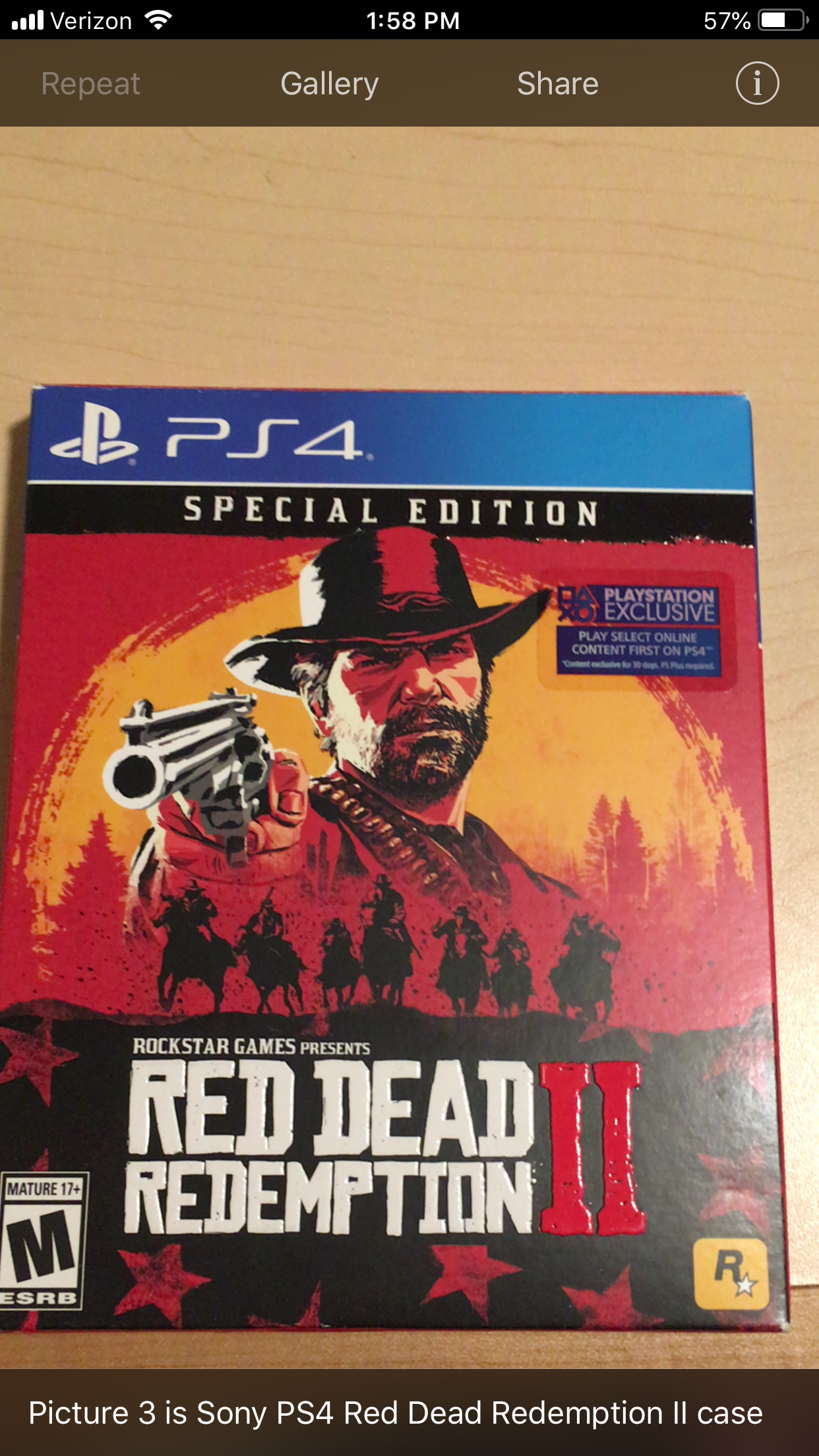
Photo: Red Dead Redemption 2 PS4 Case

Object Subtitle: Sony PS4 Red Dead Redemption 2 Case

Accuracy: Mostly Correct

This image has an empty alt attribute; its file name is rdr2-tn-tts-4.png


Photo: Get Out Blu-ray Case

Object Subtitle: Get Out Blu-ray Case

Accuracy: Correct

This image has an empty alt attribute; its file name is gotn-2.png


Photo: A Game Of Thrones By George R. R. Martin

Object Subtitle: A Game Of Thrones By George R. R. Martin

Accuracy: Correct

This image has an empty alt attribute; its file name is got-tn-2.png


Photo: Tazo Iced Green Tea Bottle

Object Subtitle: Tazo Iced Green Tea Bottle

Accuracy: Correct

This image has an empty alt attribute; its file name is tazo-tn-2.png


Photo: Sun-Maid Organic Raisin Pack

Object Subtitle: Sun-Maid Organic Raisin Pack

Accuracy: Correct

This image has an empty alt attribute; its file name is rasin-tn-1.png


Photo: Red and White Cane for the Blind

Object Subtitle: White and Red Stick

Accuracy: Fairly Correct

This image has an empty alt attribute; its file name is cane-tn-1.png


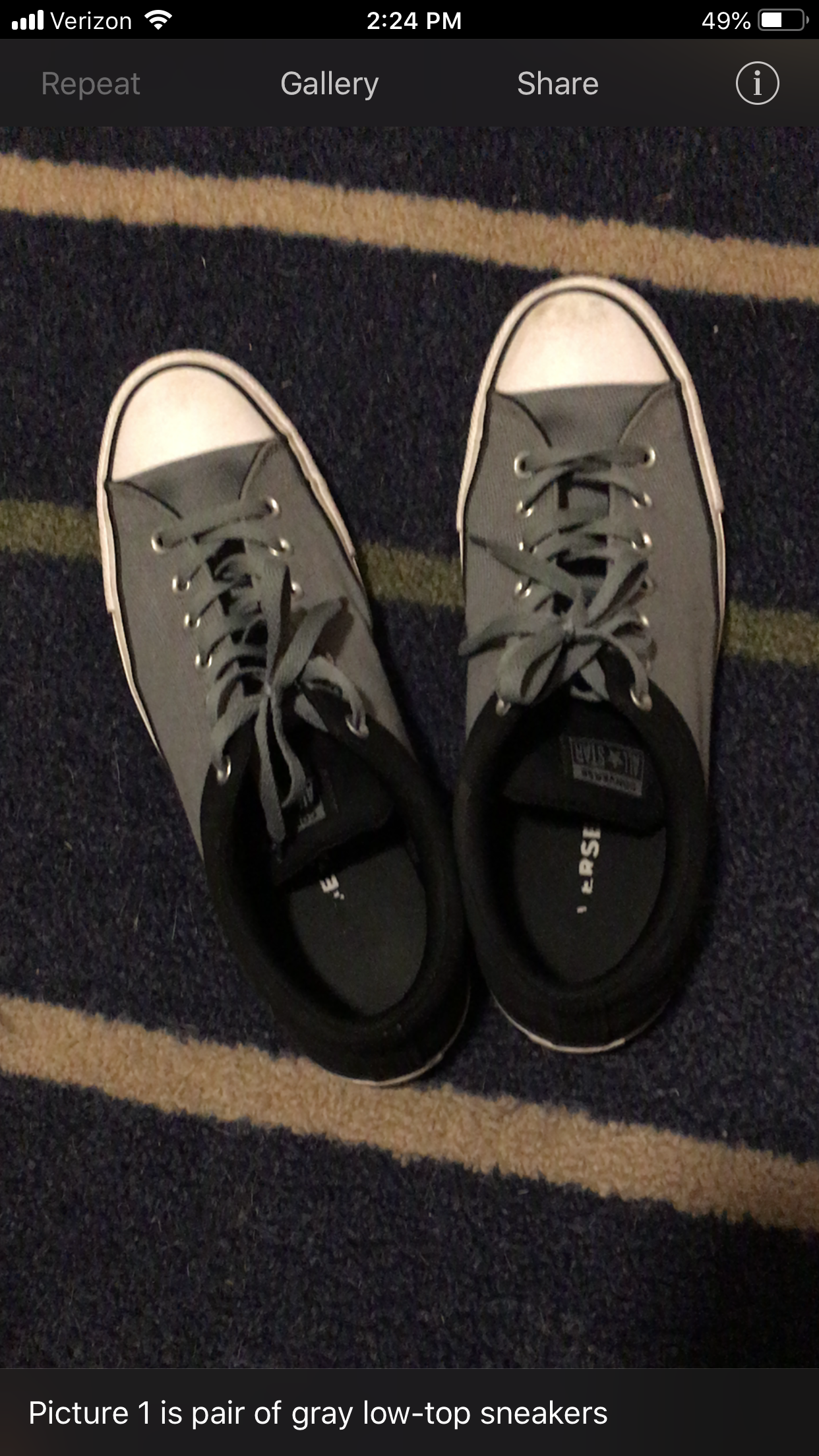
Photo: White, Grey, and Blue Converse Sneakers

Object Subtitle: Grey Low Top Sneakers

Accuracy: Fairly Correct

This image has an empty alt attribute; its file name is shoe-tn-1.png


Photo: Mead Five Star Notebook

Object Subtitle: Mead Fire Star Notebook

Accuracy: Fairly Correct

This image has an empty alt attribute; its file name is notebook-tn-4.png


Photo: Adult White and Brown English Bulldog

Object Subtitle: Adult White and Tan English Bulldog (Original scan said white and brown but forgot to take photo, so had to try to replicate and this was the first scan. Sorry.)

Accuracy: Mostly Correct

This image has an empty alt attribute; its file name is daisy-tn-2.png


Pros:

  • Recognizes objects with surprising accuracy.
  •  Simple UI (User Interface)
  • Doesn’t require a subscription
  • Free
  • 9/10 Accuracy

Cons:

  • takes a minute to process
  • Needs voice over turned on to narrate

TapTapSee is easily the best object recognition app I’ve tested. While not the fastest it is by far the most accurate, with a 9/10 success ratio you’d be hard pressed to find a better recognition app.

Final Score:8/10

Thanks for reading, if you liked this post make sure to keep an eye out for our reviews of Vhista, and Seeing AI early next week.

CBS News Investigation Finds “Bad Braille” in Major Cities

According to an investigation by CBS bad Braille is being found in major facilities across the U.S.  Per the article there have been numerous complaints to the Justice Department’s Disability Rights division over bad or misleading Braille in Pennsylvania, New Mexico, Kansas, Illinois as well as several other states. What’s alarming about this is that the places lacking in Braille are hospitals, public libraries, and U.S. public transportation systems like the Albuquerque bus system.Most blind/visually impaired who live on their own have no other way to get around other than the U.S. public transit system, so to know that some of those bus stations either don’t have Braille or that the Braille is incorrect is worrisome to say the least.

The article also mentions that a branch of the D.C. Public Library is has a huge lack of braille on signs and no Braille labeling for audio books, which is slightly infuriating see as audio books are one of the primary sources of entertainment for the blind. Hopefully this gets addressed but by the looks of it the government has known about this for awhile and has done nothing about it so unfortunately this will likely stay as it is unless they get serious push-back from advocates. 

Thanks for reading, if you think there’s a topic we should cover, feel free to leave a comment. 

Sources cited: Dorsey, Steve. “Bad Braille Plagues Buildings across U.S., CBS News Radio Investigation Finds.” CBS News, CBS Interactive, 28 June 2019, http://www.cbsnews.com/news/bad-braille-plagues-buildings-across-u-s-cbs-news-radio-investigation-finds/.

4 Ways to Pass the Time if You’re Visually Impaired

Entertaining yourself when you have trouble seeing can be a challenge sometimes. Luckily a variety of fun activities exists that can help you pass the time. Here’s our list of 4 ways to pass the time if you’re visually impaired.

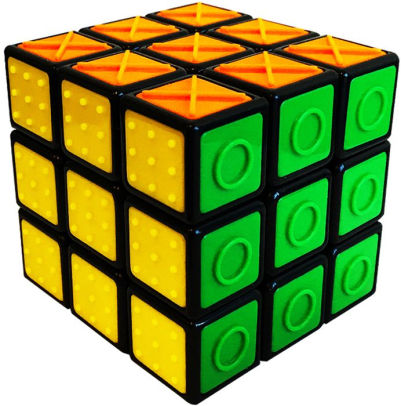
Image result for tactile rubiks cube

4. Rubik’s Tactile Cube: Starting off our list is the Rubik’s Tactile Cube. The Rubik’s Tactile Cube works like a normal Rubik’s Cube but each tile has a marker on it so those who are blind have a way to match the tiles. They cost roughly $14 on Amazon and if you miss being able to solve a Rubik’s Cube or have never previously owned one I’d recommend giving it a shot.

Image result for large print playing cards

3. Large Print Playing Cards: Messing around with a deck of cards has been a favorite pass time for as long as anyone can remember and I doubt it’s going away anytime soon. Luckily for those who are visually impaired they make large print card decks, so if you’re in dire need of a time waster, for $7 this is a safe bet.

Image result for podcast

2. Podcasts:  whether you’re working and need something to listen to or are just bored, podcasts are an excellent way to pass the time. Podcasts are available on  itunes, Google Play, Spotify, and Amazon.

Image result for audible

1.Audible: Rounding off our list is Audible, Amazons digital store front for audio books. Audible is a great way for those unable to read for themselves to still be able to enjoy literature. While the storefront is free to use Audible has a membership plan (Free if you have Amazon prime) that gets you one free book a month as well as discounts.

Thanks for reading our list of ways to pass the time if you’re visually impaired. If you feel we missed something feel free to leave a comment.

Top 5 Most Useful Tools for the Visually Impaired.

Being blind or visually impaired can be pretty difficult, luckily there’s a variety of tools and devices that can make navigating the world a lot easier. Before we get started I’d like to mention that most (if not all) of the items on this list can be obtained through your local center for the blind if you are registered with them. With that out of the way here’s our list of the 5 most useful tools for the blind and visually impaired.

5. Talking Alarm Clocks/Talking Wrist Watches: It’s hard being able to tell the time when you can’t read a normal clock, luckily talking time pieces exist to make life a little easier. The alarm clocks are basically just a giant button that speaks the time and are reasonably priced at about $30. The wrist watches look like a normal wrist watch but the clock face is in large print, so this is a good buy for those who are fully blind as well as those who are legally blind.  The wrist watches are also reasonably priced between $20-$60. 

4. Large Print Keyboards: For those who are legally blind and don’t know how to touch type, this is probably something you should look into getting. They’re on the cheaper end of things at about $25, so if you do a lot of computer work this is probably worth the investment.

3. Kindle Fire: This may seem like an odd one, but for those who are going blind and still like to read, or just want an affordable tablet with excellent accessibility features then this is great option. The text size is highly adjustable so you can make the text as large as you need. The Kindle Fire has Audible pre-installed for those who are fully blind or just find Audible easier. The 10 inch Kindle Fire normally retails about $150 but frequently goes on sale for $120.

2. Magnifiers: If your vision is worse than a 20/200 (legally blind) then having a magnifier is a must. Non-electronic magnifiers are normally fairly cheap ranging from $13-$25, while electronic magnifiers that can digitally zoom in are a bit more on the pricey side at around $150. 

1.Canes: This one’s a no-brainer, but it’s an invaluable tool worth mentioning. If you are legally blind, night blind, or fully blind and don’t have one of these I highly suggest you get one. They’re pretty cheap at about $20 on amazon, or check with your local center for the blind as they normally provide canes to those who need them.

If you think there’s an item that should have been on this list please leave a comment. Tanks for reading.

10 IOS Apps for the Visually Impaired

Despite smartphones being a huge part in our everyday lives not a lot of people realize that there are a ton of helpful apps for the visually impaired. With that being said here’s our list of the 10 best IOS apps for the visually impaired.


Image result for vhista

10. Vhista

Seller: Juan David Cruz Serrano

Price: Free (In-App Purchases)

Stars: 5/5

What It Does: Vhista is an object Identification app that uses machine learning and your phones camera to narrate your surroundings. The app is also capable of describing other peoples appearances and can even predict emotions.


Image result for color inspector

9. Color Inspector

Seller: Aaron L’Heureux

Price: Free (In-App Purchases)

Stars: 3.8/5

What It Does: Color Inspector is a color identification app meant to help those who are color blind differentiate between different colors.


Image result for prizmo pro scanner

8. Prizmo Pro Scanner

Seller: Creaceed SPRL 

Price: $9.99 (In-App Purchases)

Stars: 3.6/5

What It Does: Prizmo is a document scanner app capable of scanning and recognizing text based documents, business cards, and images. The app uses voice guidance to help those who are visually impaired properly position their phone to scan the document. Once scanned the app is capable of recognizing the text and reading it back to you.


Image result for aipoly vision

7. AIpoly Vision

Seller: AIpoly Inc

Price: Free (In-App Purchases)

Stars: 3.6/5

What It Does: AIpoly is an object and color recognition app that identifies and narrates objects in the environment to those who are visually impaired. AIpoly can recognize over 1,000 items without the subscription and does not require an internet connection to function.


Image result for talkler

6. Talkler

Seller: Talkler Labs, LLC

Price: Free (In-App Purchases)

Stars: 4.5/5

What It Does: Talkler is a free app that lets you control your email via voice commands. The app can read your email to you, mark emails as unread, record a response, and delete emails.


Image result for taptapsee

5. TapTapSee

Seller: Cloudsight, Inc

Price: Free

Stars: 4.3/5

What It Does: Taptapsee is an object identification app where you tap anywhere on the screen to take a picture and then the app’s AI will recognize the object and speak the identification back to you.


Image result for be my eyes

4. Be My Eyes

Seller: S/I Be My Eyes

Price: Free

Stars: 4.8/5

What It Does: Be My Eyes connects those who are visually impaired and volunteers via video call, where the volunteer can provide assistance in completing simple tasks. 


Image result for nantmobile money reader

3. NantMobile Money Reader

Seller: IPPLEX Holdings Corporation 

Price: Free

Stars: 3.7/5

What It Does: Nant is a currency identification app that is capable of identifying 21 different currencies and then speaks the denomination back to the user. 


Image result for seeing ai

2. Seeing AI

Seller: Microsoft

Price: Free

Stars: 4.5/5

What It Does: Seeing AI is an identification app that utilizes AI to narrate the world around you. The app is also capable of recognizing text and people.


Image result for bard mobile

1. BARD

Seller: Library Of Congress

Price: Free

Stars: 3.6/5

What It Does: BARD is the national library service for the blind and physically handicapped, which provides over 100.000 free, downloadable books and magazines, as well as musical scores to those who qualify.